An affordable low-cost business solution for take-aways complete with 15.6" Touchscreen, Printer, Cash Drawer and LoyVerse POS software. Quick and easy to set up - simply add your food & drink menu items and prices, receipt details, and you're ready to go!
Swan TakeAway POS Package
• iMin Swan2 15.6" Desktop POS Terminal
• iMin Integrated 80mm POS Receipt/Ticket Printer
• Slide-out Cash Drawer (41x41cm)
• LoyVerse Android App (free version)
• Software Support via LoyVerse Online Help Centre
No ongoing monthly or annual feesSimply pay the package price once to buy the standard package outright, the LoyVerse POS app is then free to use forever. There areno limits on how many transactions you can perform or how many items/products you can set up. No need to stress about paying each month forever, have total peace of mind.
Note: The LoyVerse free version only retains 31 days sales history. So you can run sales reports for upto the previous month. If you want Unlimited Sales History there is a subscription fee of £5+vat per month. See details
Choose your own Card Payment Provider
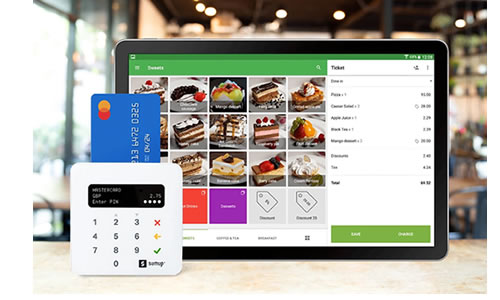
You can use either a compatible SumUp, Teya or Paypal Zettle machine for integrated card payment processing, or you can use any other card machine from your chosen provider to use manually alongside the POS system.
|
LoyVerse POS System - Optional Extras
• 10" Customer Display Tablet
• 2nd Printer - Sam4s H-Cube (Wired) Kitchen Ticket Printer
• 2nd Printer - Star TSP654IIBl Bluetooth Kitchen Ticket Printer
• Box of 20 Thermal Till Rolls
• SumUp Air Card Payment Device
• Teya Card Payment Device (with merchant account)
• IMIN Swift Handheld Waiter Pad
• IMIN K1-101 21.5" Kitchen Monitor System
• IMIN K2-201 15.6" Kitchen Monitor System
For kitchen preparation tickets, you can either print them on the same single printer as the receipts, or you can add a 2nd printer (wired or wireless) to your system.
See the
LoyVerse Extras section for details and prices on the above items.
Also see our optional
Services if you require program setup and menu programming, staff/manager training and/or on-site installation services.
POS Hardware
The iMin Swan2 is a stylish 15.6" IPS widescreen touchscreen Android terminal thin bezel design and 170 degree viewing angle for quality graphics with a full metal finish. It has an integrated 80mm thermal printer to print receipts, tickets and reports within a space-saving design. It has a strong base that allows the touchscreen to be adjusted to the required angle and utilises modern technology to give excellent performance. Connectivity includes WiFi 6, wired Ethernet and Bluetooth.
The Swan 2 runs Android 13, has an 8-Core 2.0Ghz processor, NFC, GMS with 4gb RAM memory and 64gb ROM storage. See
Swan2 Brochure.
The till system package comes complete with a slideout lockable Cash Drawer with 4 banknote sections and 8 coin slots that auto-opens when a transaction is completed.
POS Software
For hospitality businesses such as cafes, restaurants, bars and takeaways the LoyVerse POS app has numerous useful features as standard including:
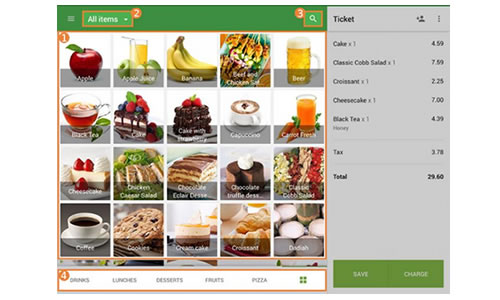
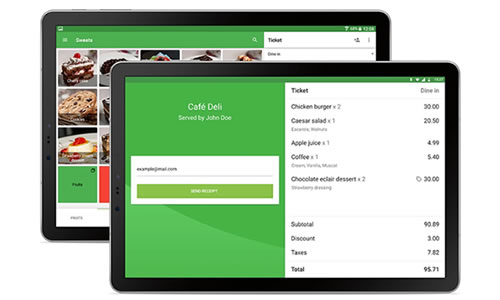
• Picture buttons or colour-coded food/drink item buttons
• Table & Tabs to keep track of bills
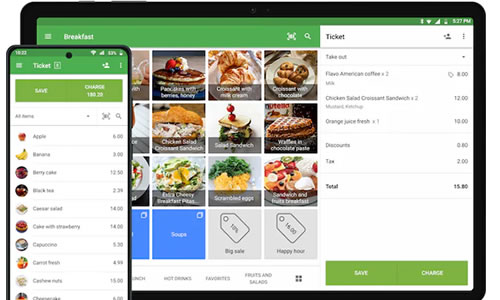
• Order type (Dine In, Take Out, Delivery)
• Print food/drink preparation tickets
• Item Comments (eg. No Onions, Extra Mayo)
• Display orders on kitchen display system
• Group products by category
• Fixed price and open price items
• Modifiers for food and drink items
• Condiments & sauces (with optional extra price)
• Apply % or Amount discounts
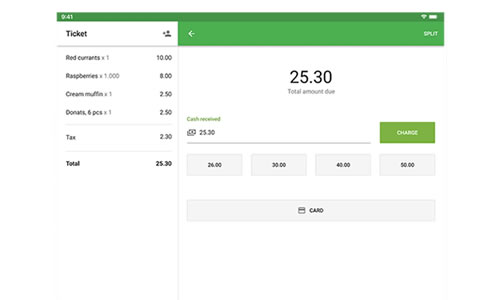
• Split bills
• Cash, card and other payment methods
• Integrated card payment with SumUp Air, Teya and Paypal Zettle
• Print or Email receipts
• Review or re-print receipts for upto 31 days
• Refunds (full or part)
• Multiple vat/tax rates
• Customer database with contact details
• Track customer total spend and purchase history
• Accumulate and redeem loyalty points
• Stock Management to track stock for each item
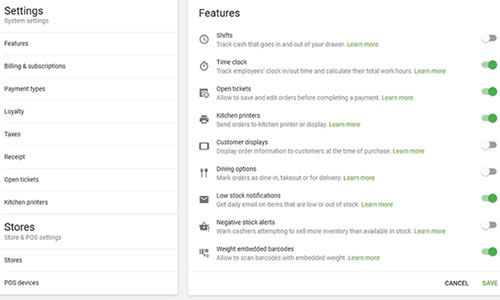
• Low Stock Alerts (when an item is about to run out)
• Negative Stock Alerts (when an item has run out)
• Daily, Weekly, Monthly reports for upto 31 days sales history
• Sales reports showing gross/net sales, discounts, gross profit
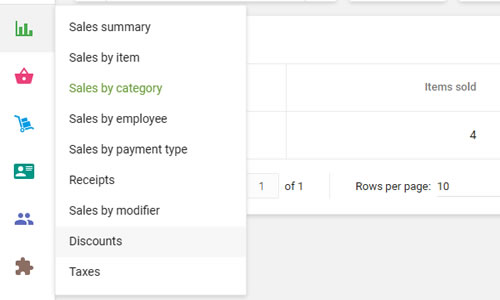
• Sales reports by individual item, by category, by payment type
• Sales reports showing discount totals & modifier sales
• Sales report by branch
• Accounts reports showing net total and vat/tax totals
LoyVerse POS App
Our Android hardware package includes a link to the LoyVerse POS app. The standard edition has comprehensive features and is completely free to use.
LoyVerse is a user-friendly, easy to use Android-based Point-of-Sale app. It allows you to register sales by either scanning a barcode, pressing a product button or by using the Search function. It supports multiple payment methods (cash, card, voucher) optionally integrating with SumUp Air, Teya and Zettle card machines if required. You can apply discounts and process refunds. You can print a mini customer receipt or email a digital receipt.
The included free
LoyVerse Back Office cloud app will run on any device and provides you with live sales data - showing sales summary, category sales, individual item sales and hourly sales. It shows live stock levels. You can review individual sales receipts. If you have multiple stores, you can view each of them live with sales data and stock levels.
It maintains sales history for a 31-day period on the free version so you can view sales performance reports via the back office Reports features.

LoyVerse POS App - Optional Modules
If you wish to interface with 3rd party ecommerce and food ordering platforms, or benefit from optional modules:
• Advanced Stock Management with purchase ordering
more
• Employee Management with Time Clock
more
• Unlimited Sales History with Export functions
more
• Integration to 3rd Party Modules
more
then you can take out a paid monthly subscription with LoyVerse to these additional modules which range from £5 to £20+ per month per store - no long-term contract, cancel the optional modules at anytime.


See fuller details and sign up for the app on the
LoyVerse website.
Additional Resources:
LoyVerse User Manual

